


At 4:47 p.m., a homeowner asks for a bathroom-renovation estimate. The website says the inquiry was received. One salesperson sees an email notification, assumes a colleague owns it and moves on. The homeowner submits again the next morning. Now there are two CRM records and still no clear next action.
That is the starting point for our fictional home-improvement company, Cedar Lane Renovations. Its problem is not a shortage of AI. It is a broken handoff between a form, a customer record and a person responsible for responding. n8n could coordinate that handoff, provided the business defines what should happen when the information is incomplete or one system stops responding.
This is an illustrative implementation blueprint, not a customer deployment, exported workflow or tested n8n configuration. The business, inquiry and workload are fictional. The featured image is an AI-generated editorial illustration created with OpenAI. The diagrams are conceptual editorial designs. No conversion improvement or measured saving is claimed.
The job is to establish ownership, not just move data
A form email is a notification, not a reliable work queue. A CRM contact is an identity record, not proof that somebody will follow up. A successful automation run is not proof that a salesperson read an alert. Cedar Lane needs to distinguish those three things.
For this pilot, each inquiry should have a durable request ID, a recorded validation outcome, a CRM reference when appropriate, an accountable owner and a due next action. Completion means those required records agree. If one is missing, the inquiry belongs in a visible exception queue rather than disappearing into a green success badge.
Make the business rules before opening the workflow builder
- Define the minimum useful inquiry. For this fictional pilot: a name, an email address or telephone number, a service choice and a service-area postal code. Keep missing information distinct from invalid information. An email format check cannot prove that an address exists.
- Choose the system of record. The CRM owns customer identity, suppression preferences and salesperson ownership. A separate restricted intake ledger holds request IDs and processing checkpoints. Do not turn n8n’s execution history into the permanent customer database.
- Agree on assignment. Cedar Lane routes an eligible bathroom inquiry to the bathroom-salesperson listed for that territory. If that person is unavailable or the mapping is missing, the duty manager owns the exception. Someone must maintain that roster.
- Set a service window. The pilot proposes an initial review within one business hour, with after-hours submissions due in the next staffed window. This is a chosen operating target, not a software guarantee. Use the company’s timezone and holiday calendar.
- Check the actual CRM contract. Confirm API access, searchable fields, allowed updates, task creation, ownership identifiers, limits and test facilities. A native integration may cover some actions; it does not establish that every required operation is supported by the company’s CRM plan.
- Name the operator. One person checks unresolved work daily and can pause outreach, correct mappings and approve recovery. A diagram without this responsibility is an unfinished operating process.
Follow one inquiry through the proposed workflow
The homeowner selects Bathroom renovation and enters a contact method and postal code. The form backend creates a stable submission reference, such as WEB-00417, and preserves it when retrying delivery. The example ID contains no customer details.
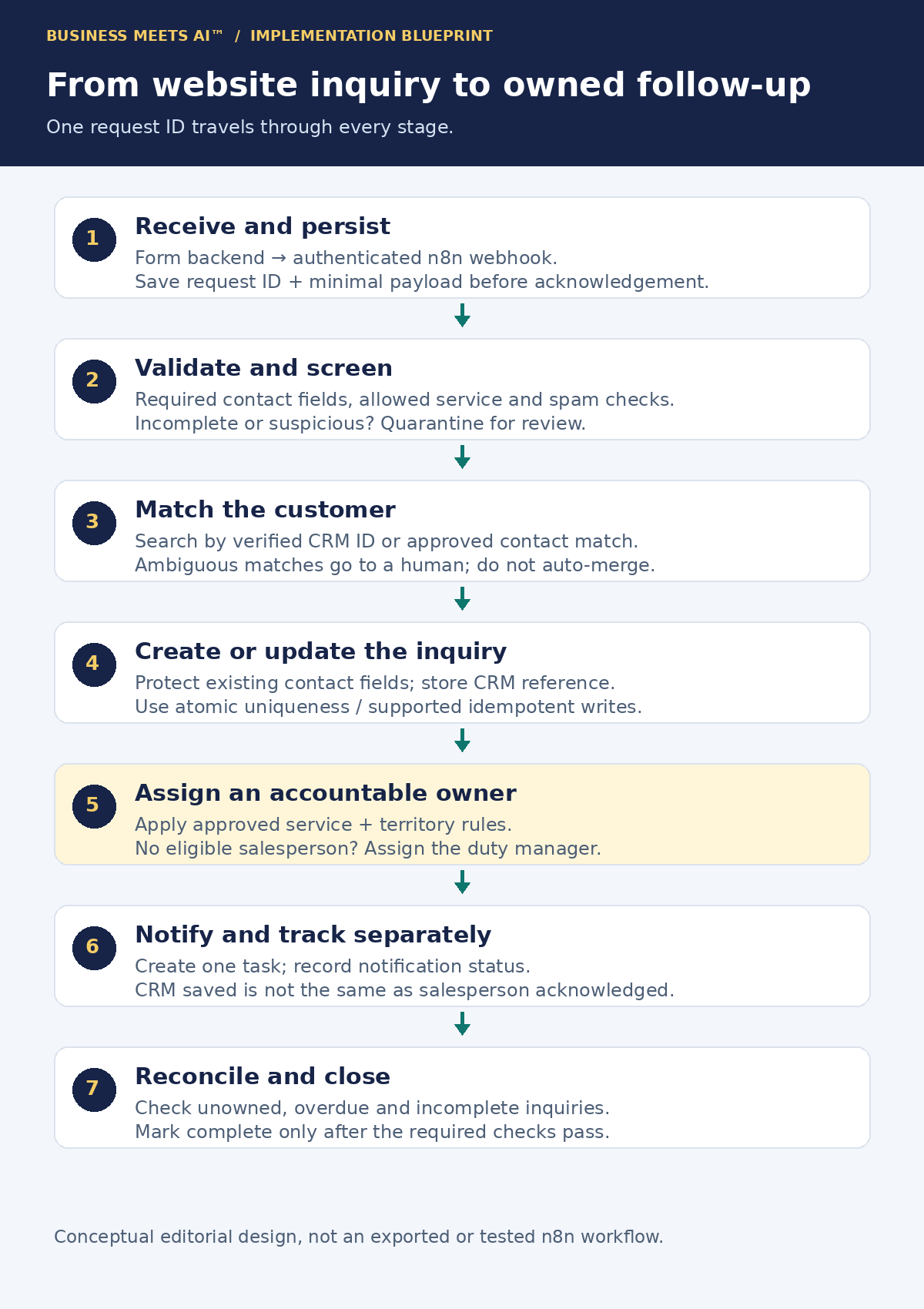
1. Receive the event, then make receipt meaningful
Have the website’s server send a POST request to n8n’s production Webhook URL using an agreed authentication method. Keep the credential on the server, not in browser JavaScript. n8n documents separate test and production URLs and supports header authentication, among other methods. Test the published workflow’s production route before connecting the live form. See the Webhook documentation.
For this design, validate the envelope and persist the request ID and minimal intake payload before returning an accepted response. The Respond to Webhook node allows control over that response. An acknowledgement means accepted for processing, not CRM updated or customer contacted. Configure the sender’s timeout and retry policy, and define how the ledger will recover work if n8n stops after acknowledging it.
If persistence fails, do not return a success message that claims the inquiry is safely queued. The form provider also needs retained submissions or another agreed fallback, with monitoring of delivery failures. An error workflow cannot rescue an inquiry that never reached n8n.
2. Validate fields without silently rejecting a plausible customer
Normalize whitespace, validate supported service values and check contact fields against the agreed schema. Keep the original value available to an authorized reviewer where needed. Do not guess a telephone country code or rewrite a name to force a match. Apply server-side spam controls and rate limits at the form boundary; webhook authentication identifies the sender, not the truth of the customer’s message.
Use ordinary conditions for predictable checks. n8n’s If node supports comparison-based branches, while expressions can map values into node parameters. Neither is a substitute for defining valid data.
An inquiry missing both contact methods is recorded as incomplete and sent to restricted review, with no automated customer outreach. If there is a usable contact method but an uncertain service area, a person can decide the next step. Suspicious entries are quarantined, not indiscriminately forwarded into team inboxes.
3. Separate duplicate delivery from duplicate people
Two copies of WEB-00417 are the same source event. A different request ID from the same homeowner may be a genuine second project. Email alone cannot settle that distinction, especially when a household shares an address.
Use an atomic unique constraint or equivalent concurrency-safe operation in the chosen ledger to claim a source ID. A separate search followed by an insert is vulnerable when two runs arrive together. If an existing entry is complete, acknowledge the repeated delivery without repeating its actions. If it is incomplete, inspect its checkpoint rather than marking it permanently processed.
Then search the CRM using a verified record ID or the company’s approved contact-matching rules. One clear match can receive a new inquiry or an allowed update. Multiple matches go to review. Do not automatically merge records, replace a salesperson or clear a do-not-contact preference. A second form submission with a new source ID needs its own business-level duplicate check, such as the same contact, service and short review window; that rule must not suppress a legitimate new request.
4. Write the CRM record and save its reference
Use a suitable native node if it supports the required operation, or the HTTP Request node against the CRM’s documented API. Check permissions, response codes and response bodies. A successful HTTP status alone does not prove that the correct fields were accepted.
Map the source reference into a supported external-reference field or a related integration ledger. Preserve customer identity, the inquiry and its follow-up task as distinct objects where the CRM supports that structure. Do not overwrite established customer fields with blank form values. Save the returned CRM ID before attempting the notification.
5. Assign a person and create a next action
Look up the approved service-and-territory mapping, verify that its owner is eligible, and create one follow-up task with a due time. An existing active opportunity may need its current owner preserved. Record which rule version made the decision so a later roster change can be explained.
If no eligible salesperson can be assigned, the duty manager becomes the named exception owner. If even that fallback is unavailable, hold the item visibly and alert the designated operator through a separate monitored channel. Do not pretend that a blank CRM owner is an assignment.
6. Notify, then check that work was acknowledged
Send the internal team a short alert containing the request reference, service, due time and a restricted CRM link. Avoid copying the full address or free-text message into a broad chat channel. Store notification status separately from CRM-write status.
A provider accepting an alert is not evidence of human acknowledgement. Cedar Lane’s daily reconciliation compares accepted intake references with CRM inquiries, owners and overdue tasks. It should surface a lead that arrived correctly but nobody picked up. A scheduled check can do the comparison; a person still owns the exceptions.
Permission to reply is not permission for every campaign
This blueprint keeps customer outreach out of the initial automation pilot. Internal capture and assignment can be tested without automatically emailing, texting or calling homeowners. Before adding outreach, define the permitted channel, purpose, source of permission, timestamp, form wording/version and applicable suppression checks.
A request for an estimate must not silently subscribe somebody to a newsletter or authorize unrelated SMS marketing. Check the current CRM suppression state immediately before an approved send, not just when the form arrived. A retry must not restore an old permission value over a later withdrawal. If permission is unknown or conflicting, hold the automated send for review while preserving the inquiry.
Rules vary by jurisdiction, recipient and message purpose. The FTC’s CAN-SPAM guidance explains the significance of a message’s primary purpose; the UK ICO guidance distinguishes solicited messages and unsolicited marketing. This operational design is not a determination that a particular campaign is legally permitted.
Design the failure path before the happy path goes live
n8n supports node-level Retry On Fail settings and pauses. Configure bounded attempts and delays for appropriate transient errors, respecting the destination’s rate-limit instructions. A rejected credential or invalid field usually needs correction, not repeated traffic.
For this proposed pilot, allow at most three attempts for a demonstrably retry-safe request, then create a dated exception for the duty manager. This is an editorial design choice, not n8n’s default. Longer outages need a durable next-attempt record and a controlled recovery process that fits the selected plan’s execution-duration limit.
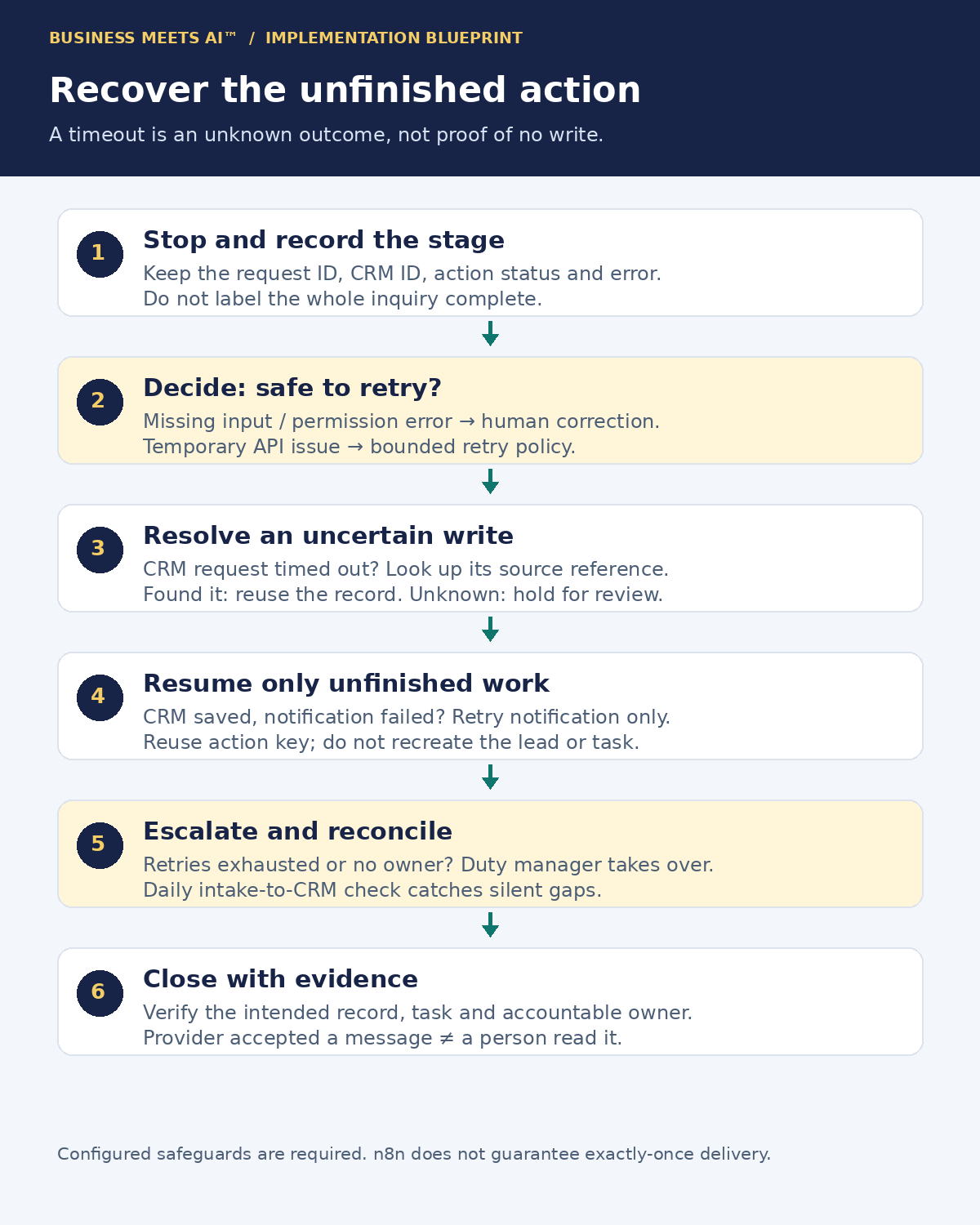
The dangerous case is a timeout after the CRM might already have created the inquiry. Searching and retrying blindly can create a second record. Where the CRM supports an idempotency key, reuse a stable key derived from the source ID and intended action. Otherwise, reconcile the destination’s external reference before retrying; if the result is still uncertain, stop for human review. Do not use a fresh execution ID as the only key, because a new run is still processing the same business event.
Track checkpoints such as intake stored, CRM saved, owner assigned, task created and notification accepted. A notification failure after a successful CRM write should resume the notification action, not recreate the inquiry. A ledger flag and an external write are not automatically one transaction: a crash between them leaves an uncertain outcome that must be reconciled. If the destination cannot support safe duplicate handling, accept a manual recovery step rather than promising exactly-once behavior.
Configure an error workflow beginning with Error Trigger and connect it in workflow settings. It reports failed runs; it does not roll back an external CRM change. Route deliberately handled exceptions into the review ledger as well. A branch that swallows an error and completes may never reach the global error handler. Monitor the handler and the ledger independently so a failed alert does not hide a failed inquiry.
What should happen when something goes wrong?
| Situation | Configured response | Evidence before closing |
|---|---|---|
| Incomplete inquiry | Hold in restricted review; no automated outreach. | Reason recorded and a review owner named. |
| Same request delivered twice | Claim the source ID atomically; resume or skip according to checkpoint. | One intended inquiry and one task, including concurrent delivery tests. |
| CRM temporarily unavailable | Retry safe actions within a limit; preserve a next-attempt record or escalate. | Destination checked; unresolved items remain owned. |
| CRM saved, notification failed | Keep CRM ID and task reference; retry only unfinished notification work. | No second CRM create; message status recorded separately. |
| No salesperson matches | Assign the duty manager exception path. | A named person and due action, not an empty owner field. |
| Partially complete run retried | Reconcile uncertain writes; reuse stable action keys and checkpoints. | Previously completed actions are not repeated blindly. |
Where AI might help, and where it should not decide
The first version needs no AI. A service dropdown plus territory rules is easier to test than inferring intent from a paragraph. Keyword rules can suggest a service for simple messages, although “not a roofing job” shows why a word match can be misleading.
A later enhancement could use n8n’s Text Classifier to suggest Bathroom, Kitchen, Roofing or Other when the customer writes an unstructured inquiry. Its documentation lists Discard Item as the default when no category matches. For a lead-intake workflow, deliberately configure the Other output and retain the inquiry for review. Do not let an unmatched model response erase it.
Compare suggestions with staff labels on a small anonymized test set. Include ambiguous requests, multiple services, negations and messages containing instructions to the model. Treat inquiry text as untrusted data. A model-generated category must not change suppression flags, authorize outreach or silently override the customer’s selected service or a protected owner rule. Restrict its output to approved labels and leave uncertain cases with a human.
The model receives data too. Remove names, addresses and contact details that are unnecessary for classification, check the provider’s processing terms and retention, and budget inference calls separately. Better labels are useful only if they reduce a real routing problem; AI is optional here.
Protect the lead data, not just the API password
Use dedicated credentials with the narrowest practical CRM permissions. Store secrets in n8n’s credential system rather than embedding them in form code, expressions, screenshots or alert text. n8n encrypts saved credentials with an encryption key. For self-hosting, protect and back up that key separately with controlled access; database encryption does not make a compromised workflow editor safe.
Limit who can edit and run workflows or inspect execution payloads. Separate synthetic testing from production destinations. Test role permissions on the actual edition: the Community edition comparison lists important exclusions, including projects and workflow/credential sharing. Do not choose an edition solely by the execution allowance.
Choose how long personal payloads are needed for debugging, what failures must be retained and who can retrieve them. n8n allows workflow-level execution-saving controls; self-hosted operators can also prune older execution data. Minimize saved successful payloads and remove unnecessary personal fields before error alerts. Keep the durable business audit trail separate, with its own justified retention and deletion process. Clearing one execution log does not delete copies in the CRM, backups, intake ledger or messaging provider.
Estimate a workload, not a miraculous saving
Hypothetical monthly assumptions: 40 original inquiries per business day across 22 business days gives 880 inquiries. Add 44 repeated webhook deliveries using existing request IDs, producing 924 intake workflow starts. Assume 44 original inquiries need review before CRM writing, leaving 836 valid inquiries. These are planning inputs, not measured customer traffic.
- Workflow executions: 924 intake starts plus one reconciliation run on each of 22 business days gives 946 scheduled/triggered starts before additional recovery runs. This is a workload estimate, not a guaranteed invoice. Current execution documentation distinguishes production runs from manual tests, called sub-workflows and designated error workflows. Verify actual quota usage, retry treatment and your account terms during the pilot.
- External API requests: assuming one CRM lookup, one contact/inquiry write and one task write for each of 836 valid inquiries gives 2,508 CRM requests, plus 836 internal-notification requests. Checkpoint storage, assignment lookups, pagination, reconciliation and retries add their own activity. Real CRM object models may require more calls.
- Optional AI: if 200 messages receive classification, budget 200 initial model calls plus any permitted retries or output repairs. Model charges depend on provider, tokens and terms; no model fee is assumed to be included in the CRM or platform price.
- Staff review: 44 incomplete inquiries at four minutes each, 22 reconciliation reviews at ten minutes each, and 20 recovery incidents at five minutes each total 496 minutes, or eight hours and sixteen minutes. This excludes build time and normal sales work. It is an illustrative workload, not time saved.
On October 29, 2026, n8n’s pricing page listed Cloud Starter at €20 per month billed annually, with 2,500 executions, five concurrent executions and a five-minute maximum execution duration. That allowance alone does not establish fit. The annual equivalent is €240 before applicable taxes or other charges; monthly billing has different terms. Check the live offer before purchasing. Cloud log retention, governance and collaboration features also vary by plan.
Self-hosted Community has no platform subscription fee, but hosting, persistent storage, backups, monitoring, upgrades and an operator’s time still cost money. Paid self-hosted editions have their own terms. n8n’s hosting documentation describes the operational choices. Keep platform fees, CRM/API charges, notification costs, optional AI, staff effort and infrastructure as separate budget lines. Saving a node does not necessarily save a workflow execution.
A pilot that can fail safely and teach you something
Start with synthetic inquiries, a test CRM and internal test destinations. Do not send customer campaigns. Run each failure case in the table, including simultaneous duplicate deliveries and a timeout after the CRM has written but before n8n receives confirmation. Inspect the destination records, not only the execution log.
Then, if that works, propose a two-week bounded intake pilot with daily reconciliation and human-controlled outreach. Record these acceptance criteria before starting:
- Every accepted source ID is accounted for as completed, incomplete, quarantined or an owned exception. Reconcile the form’s submission record against intake so missing webhooks are visible.
- Duplicate-delivery tests produce one intended inquiry and one follow-up task, with no unapproved field or consent changes. A genuine second project is not suppressed.
- Every valid inquiry has an eligible salesperson or the named duty-manager fallback. Measure time to assignment separately from time to human acknowledgement.
- All deliberately failed CRM and notification cases can be located and recovered without recreating completed actions. Unknown write outcomes require review.
- All automated outreach remains blocked when the applicable permission/suppression check is unknown or disallows it. The initial pilot does not enable customer sending.
- Record actual execution usage, external calls, review minutes and unresolved items. Do not approve expansion merely because the average looks good while one unowned lead remains hidden.
Pause automated writes if duplicate CRM objects appear, permissions are overwritten or an accepted inquiry cannot be accounted for. Keep the approved manual intake route available. Any later conversion or revenue test needs its own measurement design; a cleaner handoff does not establish an increase in sales.
When n8n is more machinery than the business needs
If the existing form and CRM can already create a record, assign an owner, prevent repeated actions and expose failures reliably, begin there. A native rule may be easier to support. If the CRM has no usable API or the company cannot maintain an exception queue, n8n cannot make that dependency disappear.
Consider a simpler managed connector when the workflow is straightforward and its recovery controls are adequate. Consider engineering help when safe writes require custom concurrency control, a durable event ledger or a complex permissions model. Self-hosting is a poor default for a company with nobody responsible for updates and restores.
The useful outcome for Cedar Lane is modest: a request such as WEB-00417 has a traceable status and a person responsible for its next action. n8n is one possible coordinator. The ownership rules, recovery design and daily discipline are what make the process worth automating.
Explore n8n and the editorial basis
See our n8n tool profile for broader capabilities, deployment choices and buying context. Use the Comparison Engine to consider n8n, Make and Zapier against the same business requirements.
Official documentation and pricing checked October 29, 2026. The scenario, safeguards, workload and proposed acceptance criteria are original editorial analysis. No live workflow, CRM compatibility, delivery result or personal implementation experience has been verified for this article. Publication approved by Joshua M. Alexander. See our Editorial Standards & Disclosures.